Objective range-of-motion records, in seconds.

Stop eyeballing ROM at re-exams. MotionArc measures it from a single camera and saves a clean, consistent record at every visit.

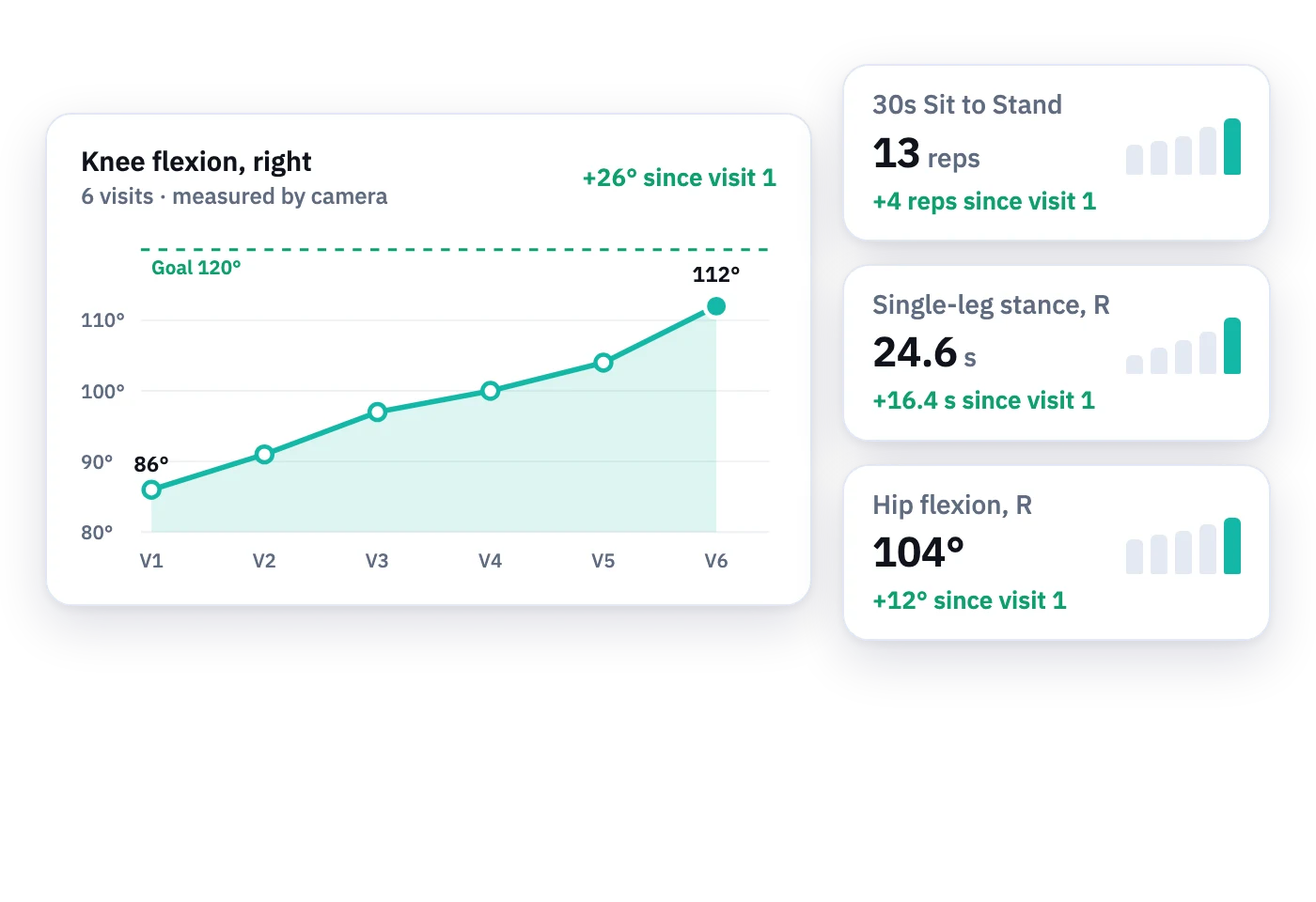
Progress report charting right knee flexion across visits, with the gain in each measure since the first visit
THE OLD WAY

ROM by eye does not make a strong record.

Re-exams, progress notes, and documentation all lean on range of motion. The method behind the number matters.

Readings vary

Inclinometer and goniometer readings shift with technique and landmarks every visit.

Measuring slows the day

Careful ROM at every visit takes time that a full schedule simply does not have.

Trends are hard to trust

If the method changes from visit to visit, the trend in your notes means much less.

Patients want to see it

Showing patients their own numbers improving beats telling them they are improving.

THE MOTIONARC WAY

A consistent ROM record at every visit.

Measured from the camera. Saved in seconds.

The same number, whoever measures

MotionArc measures from the camera with one method, so readings stay consistent across visits and across your team.

Neck and low back, too

Measure neck and low back range of motion as well as the limbs, in seconds and without slowing the schedule.

A clean record, every time

Each measurement is saved as a consistent record for your notes and insurance documentation, and patients can see their progress.

HOW IT WORKS

Measure, save, done.

No hardware and no setup.

1. Point a camera
Any phone, tablet, or laptop.
2. Run the assessment
MotionArc measures the movement.
3. Save the record
Consistent and ready for your notes.
4. Show the progress
Patients see how far they have come.
BUILT FOR BUSY PRACTICES

Measure at every visit, not just the re-exam.

When measuring takes seconds, you can track range of motion as often as you need, and your records show the full picture.

Clinician showing a patient a tablet beside a skeleton model

New patient exams

Record a clear starting point at the first visit.

Clinician with a tablet talking with a patient in an exam room

Re-exams

Compare against the baseline, measured the same way.

Doctor in a white coat standing in a clinic in front of X-ray images

Progress reviews

Show patients how far they have come, in numbers.

WHAT CHANGES

Stronger records. Faster visits. Patients who see progress.

What changes when the camera does the measuring.

Consistent records
One method across visits and doctors.
Time back
Range of motion in seconds, not minutes.
Clearer documentation
A clean record for your notes.
Visible progress
Numbers patients can see improve.
MotionArc session report pages with measurements and progress charts, ready to share

Make every ROM record count.

Access is by request.

FAQ

Questions chiropractors ask us

Straight answers. If yours is not here, request access and ask us anything.

Range of motion, including the neck and low back, plus form and balance, from a single camera. Tell us what you measure most when you request access, and we will show you how it fits your practice.

Seconds to capture, with no setup. Fast enough to run at every visit.

A clean, consistent record you can add to your notes, and progress you can show the patient over time.

No. Any phone, tablet, or laptop camera works.

Clinicians sign a business associate agreement (BAA) with us before any real patient data is entered.

No. Patients are optional. You can run an assessment and get the numbers without creating a patient record.

By default, the video is analyzed in your browser and does not leave your device. If you turn on cloud processing, frames are sent to our servers, analyzed and discarded, not stored. Clips are recorded only when recording is switched on and the person has agreed. Recorded clips are kept in our cloud storage.

Pricing is simple and usage-based. You pay for what you use, with no per-clinic lock-in.

Request access

Tell us a bit about your work.

Thanks, your request is in. We will email you when your access is on.

We review every request. If you are a healthcare provider covered by HIPAA, you sign our business associate agreement (BAA) before you enter any patient information.